
Today’s process law firm secure documents process starts from court records and up to documents about mergers. While the document might be filed away in filing cabinets, your risks will all be electronic and online. In order to have a firm guarantee that your law firm’s documents are properly secure in a time where a single click can transmit a contract worldwide, you will require more than just wishful thinking.
key takeaways
- Make sure you know where all your documents are before securing them.
- Utilize secure portals rather than email when sharing files.
- Limit access through the use of permission controls.
- Encrypt data to avoid any unauthorized access.
- Provide awareness among the employees against phishing.
- Have a plan in place before an attack takes place.
Your clients are not concerned if it was a hack, a lost laptop, or the tired associate who clicked on the wrong thing. Your clients only care about trust. So while safeguarding your information may not feel like a technical task, it is actually a promise that is made to every new client that you take on.
As per the American Bar Association, a vast number of firms report suffering at least one security breach every year. Furthermore, high-profile data breaches have proved that anyone can suffer regardless of their stature or experience. The real question is whether you make for an easy target.
Don't leave security to chance!
Not if you want systems that protect your clients and enhance your reputation. At Law Firm Growth Professor, we assist law firms in creating security systems that work for them. Your documents need more than just chance and a password.
Top Tips for Securing Documents at Your Law Firm
Large organizations make document security a priority rather than an afterthought. Similarly, all law firms make security a priority at every level of their operations. The following are some tips on how you can make your documents more secure for a longer period:
1. Select Legal Software That Makes Security a Priority
Start with the software you use every day if you want to achieve law firm secure documents without any patchwork fixes. Generalized tools are created for the masses rather than the legal community. Generalized tools are created for the masses rather than the legal community.
Payment systems are built on a structure of strict industry standards to make financial data and associated documents secure. This is particularly significant because billing records, trust accounts, and client data are all contained within a single environment. If your payment processor takes security seriously, you are minimizing risk on a key vulnerability vector.
Cloud based systems combine case tracking with document controls built right in. No more juggling multiple storage apps – just a system designed specifically for legal work. Fewer moving pieces generally equates to fewer areas for trouble.
And don’t forget to consider the issue of compliance. Working with card transactions demands consideration of the PCI standards. As a result, don’t forget to ask a would-be vendor how they handle compliance and what their process is for responding to issues. A good vendor should be able to explain this confidently, not vaguely.
2. Check Permission Settings with Precision
Good software is only half the battle. The other half is figuring out how you control what your people see. Permissions are your internal gatekeepers. Without them, your platform is just an open warehouse.
The first step in setting up permissions is to use role-based access control. The litigation associate doesn’t need to see all the corporate merger documents, for example. The support staff might need limited access to a specific folder. The idea is simple and that is control what they see without slowing them down.
Another security feature you should be considering is multi-factor authentication. This provides an additional layer of security. Just a password is no longer enough. You prevent a large percentage of attacks by asking for a code that is sent to a trusted device.
On a side note, SEO for lawyers is something you should pay attention to in case you have a website.
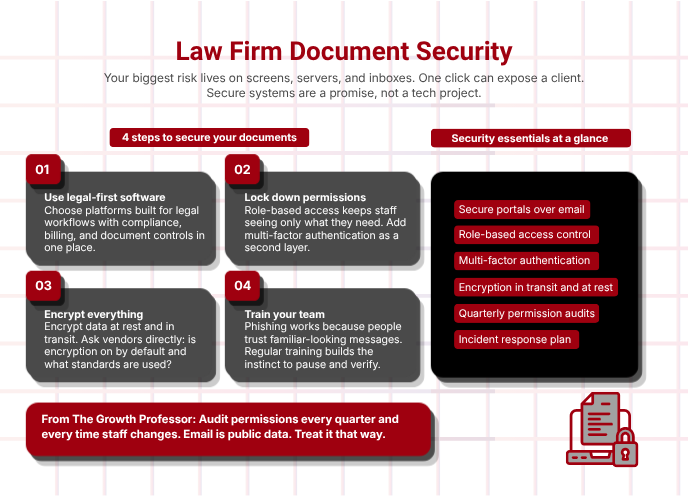
3. Use Data Encryption as Your Silent Guard
Encryption is a lock that goes wherever your data goes. This must be done in two places: at rest on servers or devices, and in transit on networks.
Encryption of your data on your office computer is not enough. If you transmit your data over the internet without encryption, you are defeating your own purpose. Therefore, you must make sure that your systems are able to encrypt your data during transmission as well as during storage.
As you are looking for a tool, you must ask some direct questions too: Is encryption on by default? Are any particular standards being followed? How are keys handled? The answers to these questions will show you how mature their security is.
Learn about law firm invoice marketing to gain some competitive edge.
expert tip
” Permissions should be audited every quarter or every time the staff changes. Email is public data; act accordingly.”

Sarah Mitchell
Information Security Consultant for Law Firms
4. Provide Employee Training That Builds Instinct
Technology won’t help with careless clicking. The reason some attacks get past defenses is that a person clicked because they believed a message, which seemed urgent or familiar, must be genuine. An email from a partner requesting a wire transfer, which is a phishing email, might get past filters if a staff person complies with it.
Training is the solution. Educate your staff about how phishing works. Demonstrate it with examples. Discuss how attackers use imitations of the company. They will be more careful once they understand how it works.
Review your training periodically. New threats emerge and people might forget. One careful question might save a breach. Additionally, check out law firm marketing guide.
Do not wait for a headline anymore!
Build systems that help your law firm secure documents and win client trust. Law Firm Growth Professor can guide your firm through smart upgrades that fit your size and budget. Strong security supports strong growth.
Conclusion
The process of law firm secure documents combines part of the process with the other part, which is smart technology. When the risk decreases and the level of confidence increases, it shows that the process has worked well. Every document can only be as secure as the weakest part of the process. This explains the importance of every part of the permission. Consult Law Firm Growth Professor today and find out how fast law firms can grow with deep trust.
FAQ
What does "law firm secure documents" mean?
It means keeping unauthorized people from accessing, leaking, or losing client documents. It involves technology, policies, and practices in your law firm.
Why is email a risky method for law firms to share files?
Email can be intercepted or misforwarded or infected with a virus. Secure portals minimize these risks and put you in control.
How often should we review document permissions?
You should review document permissions at least once a quarter, as well as after any hiring, leaving, or change in job function.
What is the role of encryption in law firm document security?
Encryption converts readable data into unreadable code, keeping data secure on the server or in transit.
Do small law firms need enterprise-level security?
Yes, because attackers target small law firms with poor defenses, and robust security protects your reputation and clients’ trust.